Showing posts with label maze. Show all posts

2017-05-14

Making Deventer's Mazes

In my previous post (the very first one!) I described how to solve an unique 3D maze puzzle by using RRT path planner provided by RobWorkStudio.
The original puzzle was designed by Oscar van Deventer and it consists of three orthogonal flat plates, each carved with the 2-dimensional maze. The three plates restrict the movement of a star-shaped cursor within the cube, such that it can only move on an invisible 3-dimensional path projected by the mazes on the side (see fig. 1).

Fig. 1. Deventer's maze recreation. The cursor is the star-shaped orange-ish shape inside the cube.

We were left with an open question of how to programmatically generate a new puzzle just like this.
The naive extension of backtracking algorithm into 3D works well, but it is not suitable to make Deventer's Maze without modification. The projection of 3D path generated by the algorithm on the orthogonal walls of the puzzle would inevitably contain loops. Indeed, the absence of loops on the walls seem to be the leading constraint in this problem.

A simple idea would be to build 4 separate mazes in parallel using the backtracking algorithm. 3 of these mazes would be two dimensional, representing the sides of the cube, while the fourth one would be fully 3D. The 3D maze would be the primary one used for the construction: the backtracker would explore the cells at will, except that while finding neighbouring adjacent unvisited cells, the side mazes would be used to guard against forming loops. Simply put, if the new candidate unvisited cell's projection is visited, and  no direct connection exists to that cell on the side maze, it is not elligible to be the candidate for the neighbour. Unvisited projection cells and those that already have connection (including to itself) are allowed.
This generation procedure has to be repeated, since not all of the cells will be visited on the first call of the backtracker. Some of the cells will be inaccessible from any one given path, and thus the backtracker has to be called again, starting from the next unvisited cell found.
This is perhaps a little obfuscated explanation; please check the code for the details.

I made an implementation of the Deventer Maze generator in Javascript HERE.
The repository is available at: https://github.com/dagothar/deventer.
.
Fig. 2. JS implementation of the generator. Take a look!

This is how the algorithm looks in action (fig. 3):
Fig. 3. Generating a new 8 x 8 x 8 maze.


The result is presented below (fig. 4):
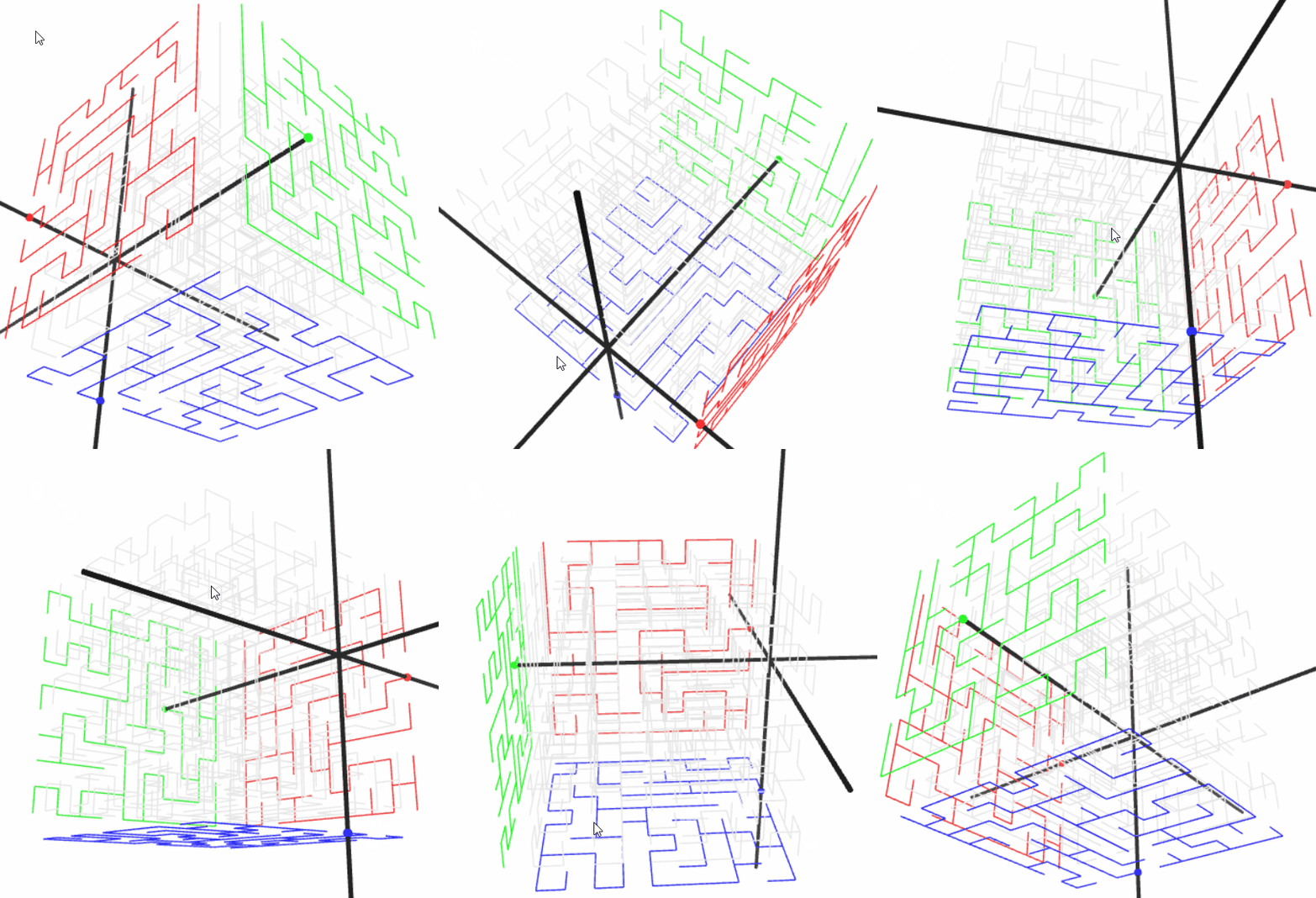
Fig. 4. The result.


Of course, it is also possible to build larger puzzles (see fig. 5), although it quickly becomes a computational challenge.

Fig. 5. Generating large mazes may take a while (25 x 25 x 25).

I programed the generator such that you can try solving the generated mazes as well. The black star shape is the cursor, and you can move it using the W / A / S / D / Q / E keys:
  • W / S move the cursor in the X direction (away / towards the red maze),
  • A / D move the cursor left / right (away / towards the green maze),
  • Q / E move the cursor down / up (towards / away the blue maze).
It is quite difficult to solve even the simplest mazes (see 3 x 3 x 3 in fig. 6)! In case you get stuck, you can use the input fields for the cursor position in the panel on the right to move without the path constraints.

Fig. 6. Navigating the 3 x 3 x 3 maze.

The panel on the right also provides some information. First, it indicates if the current maze corners all belong to a single path component. This will not always be the case. Next, the number of separate paths is provided. The first path will most likely be the largest component and its size is also provided.

There are still a couple of problems with this approach though. Very often, no path is generated that connects all corners of the maze. Such a result I do not consider to be a proper puzzle, since not all of the corners can be reached from single chosen starting configuration. The issue could perhaps be amended by growing separate and unbiased trees at every corner of the cube and then prioritizing the merging of the trees. I am not sure that would guarantee that the generated puzzle is proper.
Of course, it is likely not possible to make a nice random and aesthetic tree exploring all cells of the puzzle. The original creation itself did have cells which were not reachable from the starting configuration.

It would be nice to create the actual 3D models based on the generator presented here. I will work on that in the future.

2017-05-06

Mazes

Fig. 1. Yo, I heard you like mazes...


There is scarcely anything in the world that I like more than mazes. It wasn't until quite recently till I had an opportunity to navigate a real hedge maze made out of planted bushes, located in Egeskov in Fyn, Denmark. The maze proved to be considerably more dificult than I expected! It took me nearly 40 minutes to get to the exit. I greatly recommend this wonderful place - there are lots of other amazing things to see there!

Fig. 2. Egeskov maze (from egeskov.dk).

This post is about mazes. I made a little JS application for maze generation, solving and general maze playfulness (see fig. 3). The application is located HERE, and the source code is available at https://github.com/dagothar/labyrinth.


Fig. 3. The Labirynth application.

The demo includes following features:
  • create mazes of various dimensions using backtracking method,
  • navigate mazes using W, S, A, D keys,
  • click on the maze to make the Theseus dot go to the indicated direction,
  • animated maze creation,
  • customize maze looks (cell dimensions and color),
  • upload your own background (makes for some nice avatar pictures!),
  • test out parametrizable modified normal distribution used for maze generation,
  • bugs (?).

Many resources are available on the topic of maze generation on the web. One that I can certainly recommend is Jamis Buck's blog: http://weblog.jamisbuck.org/2011/2/7/maze-generation-algorithm-recap. The blog contains very good descriptions, implementations and animations of various maze generation algorithms. The author has also published a book: Mazes for programmers (which I ordered, but unfortunately it haven't arrived yet; maybe I shall make a review when it does?).

I use a staple of maze generation algorithms: a recursive backtracker. Simply put, each step a connection to a randomly selected neighbouring cell is made by removing the wall in between. If there are no neighbours to choose from, you follow the carved path backwards, until there is an adjacent unexplored cell. The procedure is repeated until all of the cells are explored. One of the bonus features of the method is that you get the tree like structure of the cells completely free of charge, making the subsequent navigation queries that much easier. See the maze being carved out in fig. 4.

Fig. 4. Building a regular maze.

I made it so that you can easily solve the maze and move the Theseus around with a simple click of a mouse (see fig. 5).

Fig. 5. Solving the maze.

You can also upload your own background image and get some nice effects! (You should probably set the transparency on the path/wall colors for this to work).


One of the interesting things you can do is to give a 'kick' to the distribution of offsets used when selecting the next neighbouring cell. You can scale, twist and turn the normal distribution so that some directions are preferred to the others. This could possibly make the generated mazes more interesting giving them some kind of structure. 

How is the distribution 'stretched'? A couple of transformations are applied: scaling, rotation and translation. See the image below for the visual explanation (fig. 6).

Fig. 6. Modifying the random offset distribution for selecting new tiles to explore.

Mathematically, the new distribution is calculated as:

x = randn()
y = randn()

nx = sx*cos(a) * x - sy*sin(a) * y + tx;
ny = sx*sin(a) * x + sy*cos(a) * y + ty;

where x and y are random variables with normal distribution, sx and sy are scaling factors, a is the angle and tx/ty are the translations.

I made the application such that custom user expressions can be used to change the shape of normal 2D distribution. This is done by entering JavaScript language expressions into assorted fields: Angle, X scale, Y scale, X translation and Y translation. All JS math function can be used in these. Additionally, the following variables are available:
  • x - the current column of the maze,
  • y - the current row of the maze,
  • cx - the center column of the maze,
  • cy - the center row of the maze.
Check the text below for some ideas and examples.
Note: The maze generation starts at the row and column indicated by the red dot. Some of the effects are achieved when starting from the center of the grid.


Let's try that with the following set of distribution parameters (see fig. 7):

x scale:
Math.sqrt(Math.pow(x-cx, 2)+Math.pow(y-cy,2))

y scale:
Math.sqrt(Math.pow(x-cx, 2)+Math.pow(y-cy,2))

x translation:
-(x-cx)

y translation:
-(y-cy)

Such a distribution prefers the choice of the newly explored cells located close to the center of the maze. The effect seen in fig. 7 is a maze in which the passages tend to align slightly in concentric layers starting in the middle.

Fig. 7. Building 'ring' maze.


In the example below, the distribution is somewhat stretched and the angle depends on the angular position of the current cell with respect to the middle of the maze (see fig. 8). The parameters are (angles are in radians!):

angle:
1.57+Math.atan2(y-cy, x-cx)

x scale:
3

Fig. 8. Building 'concentric' maze.


The next maze shows the usage of the trigonometric functions. It is built on a 32x32 grid, so that the values of 0.1x and 0.1y span the [0, pi] range. The angle and translation parameters are left as default, but scaling is done in the following fashion:

x scale:
10*Math.sin(0.1*x)

y scale:
10*Math.sin(0.1*y)
The result is shown in fig. 9. The sides of the maze are mostly horizontal/vertical pathways, while the center remains tangled like in a regular maze. The center forms a characteristic 'bump'.

Fig. 9. Building 'bump' maze.


Another example - switching corridor directions:

x scale:
(x-cx)/(y-cy)>0 ? 20 : 1

y scale:
(x-cx)/(y-cy)>0 ? 1 : 20


Fig. 10. Checker-pattern maze.

What kind of a maze can you build?

2017-03-06

Solving Deventer's Maze


I encountered Deventer's puzzles first while browsing some old treasures (A. K. Dewdney's book "The Magic Machine: A Handbook of Computer Sorcery"). The book itself (as well as its companion: "The Armchair Universe") is full of wonderful curiosities, guaranteed to attract the attention of a person seeking intellectual fodder.

Fig. 1. Deventer's Maze (or Oskar's Cube) visualized in RobWorkStudio.


Deventer's Maze (that's how A. K. Dewdney refered to it) - or Oskar's Cube - is one of many Oskar van Deventer's puzzles (his works can be found at: http://oskarvandeventer.nl/). This particular one is a clever 3D maze (see Fig. 1). Each of 3 cube sides casts a different shadow. The star-shaped piece inside restricts the movement of the center part, where all the rods connect. The goal is to navigate the center of the star through the invisible maze inside. One might, for example, choose to go from one corner to another.

The puzzle is quite tricky to purchase. With no means to obtain the artifact, I chose to make my own simulated version using the RobWork (www.robwork.dk) framework. I found the puzzle photos and used them to re-create the 3D models of the sides. I then created a RobWork representation of the device. The representation consists of several XML files in which the positions of the models which make up the cube sides are defined. The Scene.wc.xml is the file that you need to open in RobWorkStudio. It also defines the star as a mechanism of three prismatic joints moving orthogonally in X, Y and Z directions respectively.

The solution itself is quite simple and requires no programming whatsoever. Simply define the start and the goal configurations (using the Jog plugin to move the star while avoiding collisions). The planning can be done using one of the plugins (Planning) already included in RobWorkStudio package.
You have to use the RRT planner. Then, after the planning is complete, you can view the animation of the star moving about the maze using the Playback plugin.

Here's the video: https://youtu.be/EEDx81GYclU

And here's a link to GitHub project for if you want to play around with the maze: https://github.com/dagothar/deventer

I have also rendered the "invisible" maze inside (see Fig. 2).
Fig. 2. The "invisible" path inside the cube visualized.
That's just first of many curious things that I have on my mind at the moment. Delving into the details of the solution is certainly appealing. Perhaps I will dwell a little more on that in the near future.

It would be interesting to use some kind of haptic device to make the simulation more real. And to devise a method to generate random Deventer's mazes.